> ## Documentation Index
> Fetch the complete documentation index at: https://docs.calius.io/llms.txt
> Use this file to discover all available pages before exploring further.
# Settings
> Configure your Calius preferences!
Settings controls how Calius looks, how it writes listings, and how it notifies you.\
Settings sync between desktop and mobile, so set them up once on desktop.
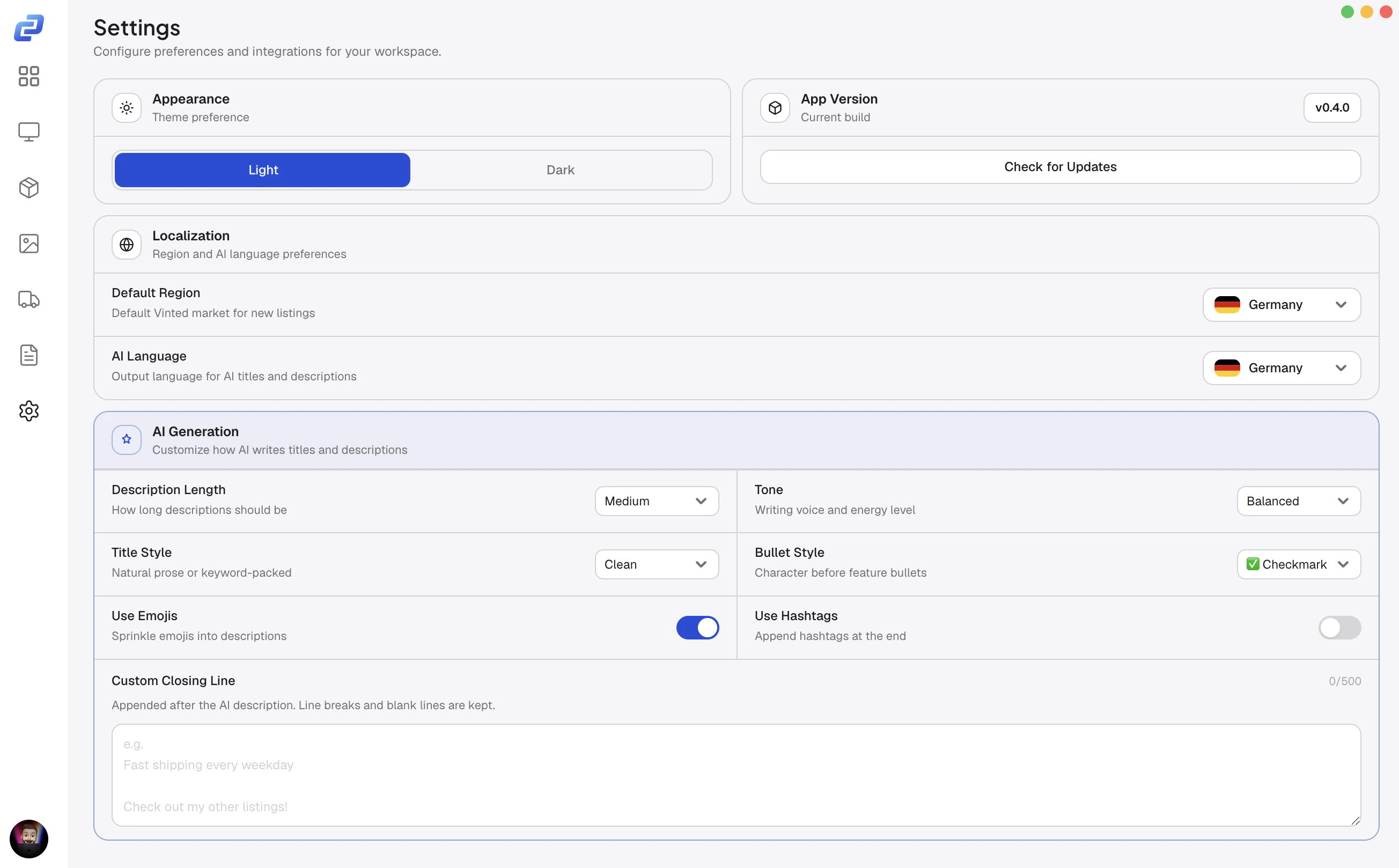 ## Appearance
Calius has a light and a dark theme.
## Vinted region
The Vinted region sets the language of the listing fields in the item editor.
1. Open **Settings**.
2. Under **Vinted Region**, pick your market.
This only changes the field language in the editor.\
To set which market an account sells on, see [Vinted](/platforms/vinted).
## AI generation
These settings control how they read.
### Language
Sets the language for AI titles and descriptions. \
Match it to your market: German for Vinted.de or Kleinanzeigen, French for Vinted.fr.
### Style and tone
| Setting | What it does |
| ------------------ | -------------------------------------------------------- |
| Title style | Detailed titles add brand, condition, and key attributes |
| Tone | Sets the writing voice, from casual to professional |
| Description length | Sets how long descriptions run |
| Bullet style | Checkmark ✅, arrow ➡️, dot •, or none |
| Use emojis | Adds emojis to the description |
| Use hashtags | Adds hashtags at the end |
| Closing text | A fixed line added to every description |
### AI in the item editor
| Feature | When it appears | What it does |
| ---------------------- | ------------------------------------------------- | --------------------------------------------------- |
| AI Fill | 2+ images and an empty title or description | Writes a title and description from your photos |
| Description from Title | A title is set and the description is empty | Writes a description from the title |
| AI Variations | Image Optimization is on and 2+ accounts selected | Writes a separate title and description per account |
## Webhooks
Post to Discord when something happens: a sale, a new listing, an edit, a delist, or an offer.
1. Go to **Server Settings > Integrations > Webhooks** and create one.
2. Copy its URL.
3. In Calius **Settings**, paste it into the matching field.
| Webhook | Posts when |
| ------------- | ------------------------------------------------------------------------ |
| Sale | An item sells |
| Item Activity | An item is listed, delisted, or relisted, or an offer or message arrives |
## Updates
Calius checks for updates in the background. \
When one is ready, it downloads and shows an **Install & Restart** button.
To check manually, open **Settings** and click **Check for updates**. \
Your version is shown at the bottom of the page.
## License
To move Calius to a new machine, deactivate here first, then activate on the new device.
## Appearance
Calius has a light and a dark theme.
## Vinted region
The Vinted region sets the language of the listing fields in the item editor.
1. Open **Settings**.
2. Under **Vinted Region**, pick your market.
This only changes the field language in the editor.\
To set which market an account sells on, see [Vinted](/platforms/vinted).
## AI generation
These settings control how they read.
### Language
Sets the language for AI titles and descriptions. \
Match it to your market: German for Vinted.de or Kleinanzeigen, French for Vinted.fr.
### Style and tone
| Setting | What it does |
| ------------------ | -------------------------------------------------------- |
| Title style | Detailed titles add brand, condition, and key attributes |
| Tone | Sets the writing voice, from casual to professional |
| Description length | Sets how long descriptions run |
| Bullet style | Checkmark ✅, arrow ➡️, dot •, or none |
| Use emojis | Adds emojis to the description |
| Use hashtags | Adds hashtags at the end |
| Closing text | A fixed line added to every description |
### AI in the item editor
| Feature | When it appears | What it does |
| ---------------------- | ------------------------------------------------- | --------------------------------------------------- |
| AI Fill | 2+ images and an empty title or description | Writes a title and description from your photos |
| Description from Title | A title is set and the description is empty | Writes a description from the title |
| AI Variations | Image Optimization is on and 2+ accounts selected | Writes a separate title and description per account |
## Webhooks
Post to Discord when something happens: a sale, a new listing, an edit, a delist, or an offer.
1. Go to **Server Settings > Integrations > Webhooks** and create one.
2. Copy its URL.
3. In Calius **Settings**, paste it into the matching field.
| Webhook | Posts when |
| ------------- | ------------------------------------------------------------------------ |
| Sale | An item sells |
| Item Activity | An item is listed, delisted, or relisted, or an offer or message arrives |
## Updates
Calius checks for updates in the background. \
When one is ready, it downloads and shows an **Install & Restart** button.
To check manually, open **Settings** and click **Check for updates**. \
Your version is shown at the bottom of the page.
## License
To move Calius to a new machine, deactivate here first, then activate on the new device.