> ## Documentation Index
> Fetch the complete documentation index at: https://docs.calius.io/llms.txt
> Use this file to discover all available pages before exploring further.
# Vinted
> List across Vinted markets and let Calius handle offers and visibility automatically.
Vinted is a second-hand fashion marketplace. Calius connects multiple Vinted accounts, lists the same item across markets, and answers buyer offers for you.
## Markets
Each Vinted account sells on one market. Open an account's settings and set its **Market** to choose the region and the language of the listing fields.
| Market | Site |
| ------------------- | ------------ |
| 🇩🇪 Germany | vinted.de |
| 🇦🇹 Austria | vinted.at |
| 🇫🇷 France | vinted.fr |
| 🇮🇹 Italy | vinted.it |
| 🇪🇸 Spain | vinted.es |
| 🇳🇱 Netherlands | vinted.nl |
| 🇬🇧 United Kingdom | vinted.co.uk |
| 🇨🇿 Czech Republic | vinted.cz |
| 🇵🇱 Poland | vinted.pl |
## Image optimization
Listing the same item from two or more accounts can trigger Vinted's duplicate detection. **Image Optimization** applies a small per-account change to each photo, so the listings read as separate items.
The toggle sits in the basics step of the item editor when Vinted is selected. Leave it off if you only use one account.
## Auto-negotiation
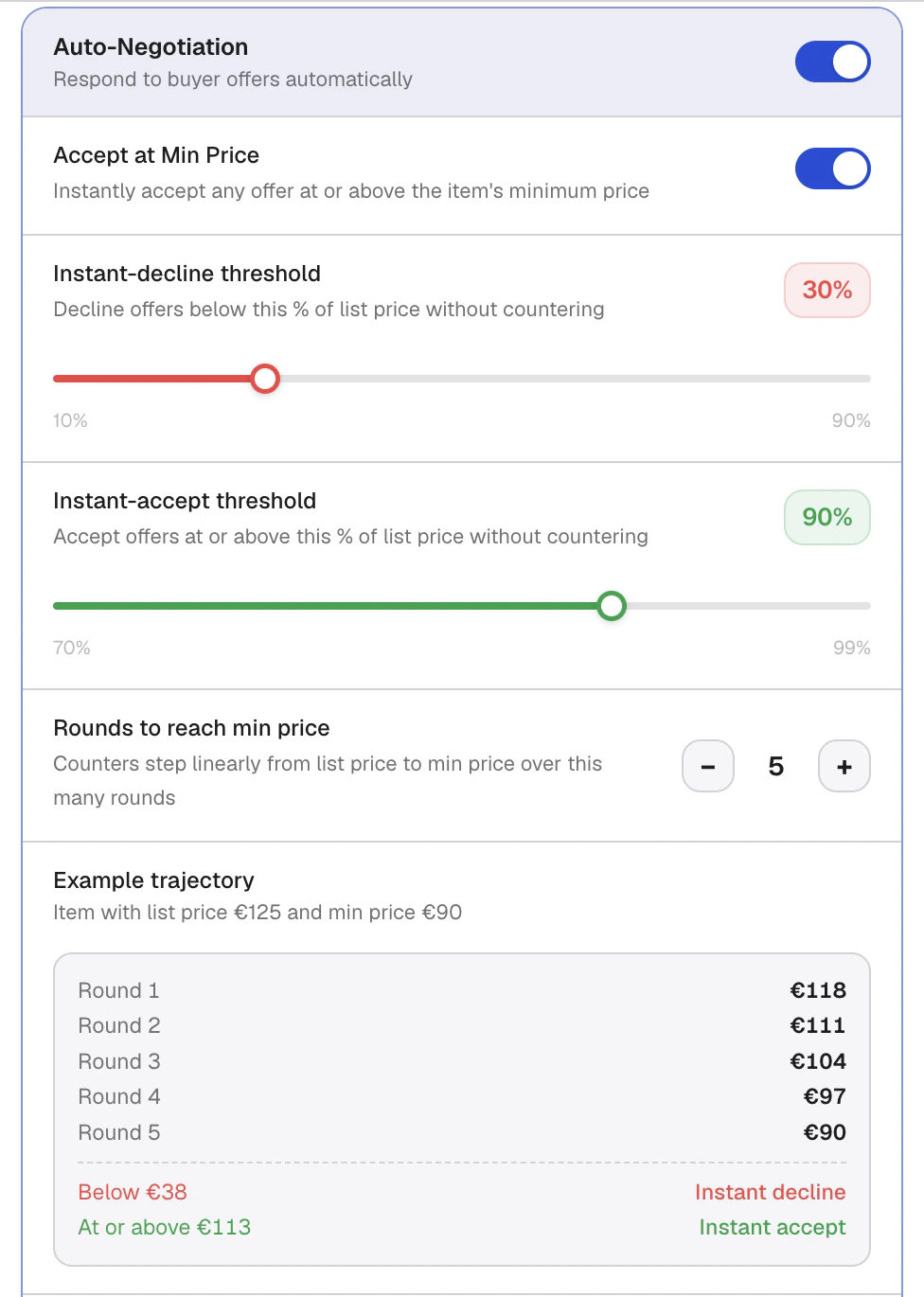 Calius reads incoming Vinted offers and replies for you, based on rules you set. It checks every connected inbox in the background.
Set a **minimum price** on the item first. Calius never counters or accepts below it.
For each offer, Calius decides in this order:
1. ❌ **Declined** when the offer is below your decline threshold.
2. ✅ **Accepted** when it is above your accept threshold and at or above your minimum.
3. 🔄 **Countered** for anything in between.
Counters step down toward your minimum price over several rounds. With a list price of 125, a minimum of 90, and 3 rounds, the buyer sees 113, then 101, then 90.
### Settings
| Setting | Controls | Default |
| ----------------------- | ------------------------------------------------ | ------- |
| Enable auto-negotiation | Turns the engine on | Off |
| Use minimum price | Accepts any offer at or above your minimum | Off |
| Instant decline below | Declines offers under this percent of list price | 50% |
| Instant accept above | Accepts offers over this percent of list price | 90% |
| Max counter rounds | Counters before reaching the minimum | 3 |
| Reply delay | A random pause before each reply | On |
If you reply to a buyer yourself, Calius drops that thread and does not counter again.
## Favorite offers
Calius reads incoming Vinted offers and replies for you, based on rules you set. It checks every connected inbox in the background.
Set a **minimum price** on the item first. Calius never counters or accepts below it.
For each offer, Calius decides in this order:
1. ❌ **Declined** when the offer is below your decline threshold.
2. ✅ **Accepted** when it is above your accept threshold and at or above your minimum.
3. 🔄 **Countered** for anything in between.
Counters step down toward your minimum price over several rounds. With a list price of 125, a minimum of 90, and 3 rounds, the buyer sees 113, then 101, then 90.
### Settings
| Setting | Controls | Default |
| ----------------------- | ------------------------------------------------ | ------- |
| Enable auto-negotiation | Turns the engine on | Off |
| Use minimum price | Accepts any offer at or above your minimum | Off |
| Instant decline below | Declines offers under this percent of list price | 50% |
| Instant accept above | Accepts offers over this percent of list price | 90% |
| Max counter rounds | Counters before reaching the minimum | 3 |
| Reply delay | A random pause before each reply | On |
If you reply to a buyer yourself, Calius drops that thread and does not counter again.
## Favorite offers
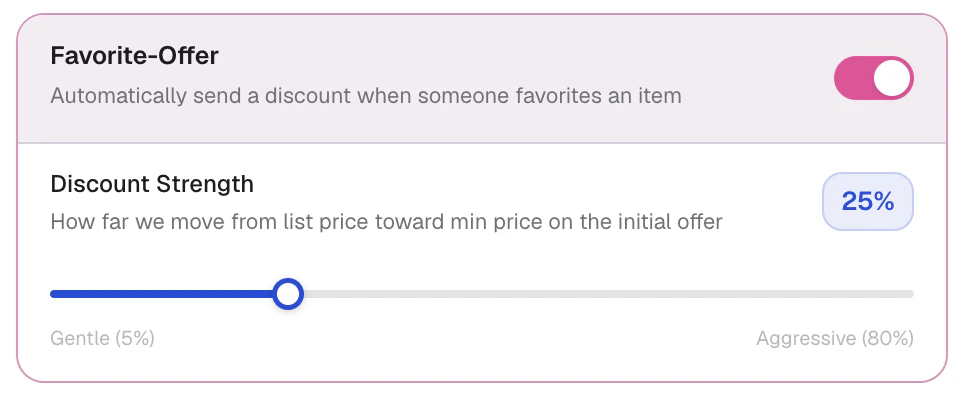 When a buyer favorites your item, Calius can send them a private discounted offer. Turn it on and set how far below the list price the offer goes. The price never drops below your minimum. If the buyer counters, auto-negotiation takes over.
| Setting | Controls | Default |
| ---------------------- | ---------------------------------------- | ------- |
| Enable favorite offers | Sends an offer when an item is favorited | Off |
| Discount percent | How far below list price the offer goes | 20% |
Favorite offers only fire for items in your Calius inventory that have a minimum price.
## Relisting
When a buyer favorites your item, Calius can send them a private discounted offer. Turn it on and set how far below the list price the offer goes. The price never drops below your minimum. If the buyer counters, auto-negotiation takes over.
| Setting | Controls | Default |
| ---------------------- | ---------------------------------------- | ------- |
| Enable favorite offers | Sends an offer when an item is favorited | Off |
| Discount percent | How far below list price the offer goes | 20% |
Favorite offers only fire for items in your Calius inventory that have a minimum price.
## Relisting
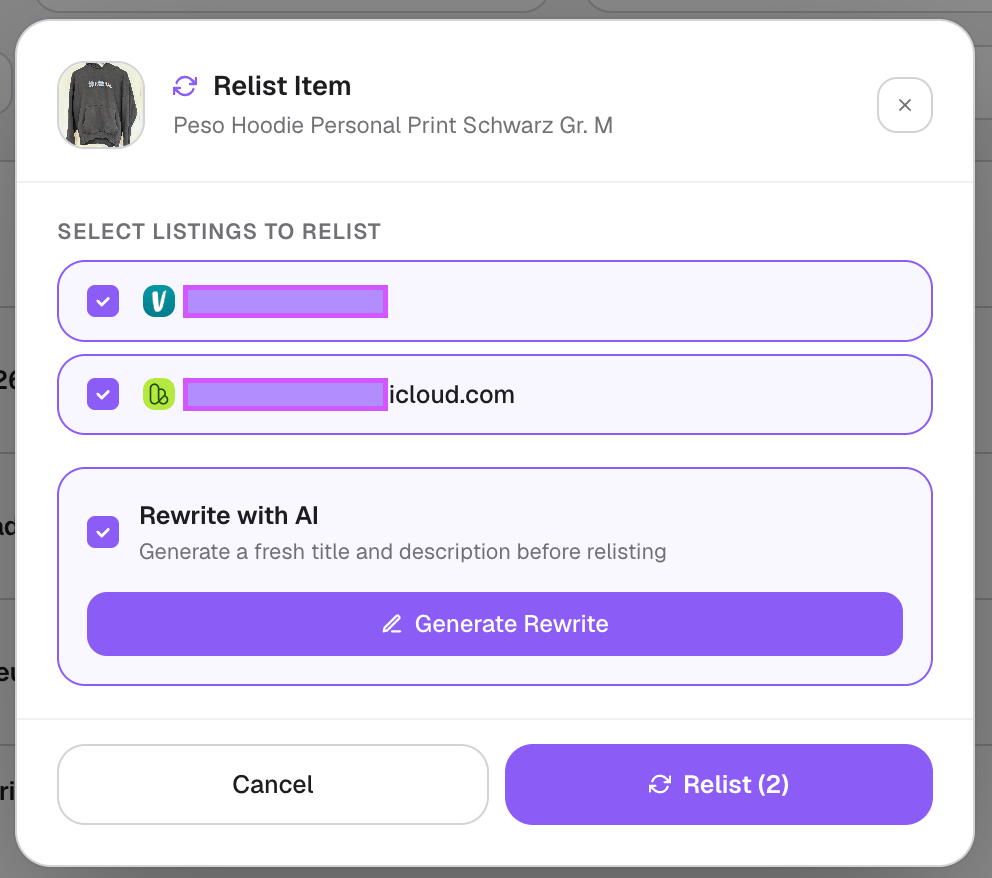
 Relisting posts an item again, so it returns to the top of the results and stays visible.
* **After a sale**: when a multi-quantity item sells, Calius relists the remaining stock automatically after a delay.
* **Manually**: use the **Relist** button on any listed item in the [Inventory](/Inventory#relisting) tab.
| Setting | Controls | Default |
| ----------------- | --------------------------------------------------------------- | ------- |
| Relist delay | Minutes to wait after a sale before the automatic relist | 10 |
| Rewrite on relist | Writes a fresh AI title and description on the automatic relist | Off |
The relist delay can be set from 1 to 180 minutes.
## FAQ
Vinted needs at least 3 images per listing.
Calius detects the sale, removes the item from your other platforms, and records it in your sales feed.
Relisting posts an item again, so it returns to the top of the results and stays visible.
* **After a sale**: when a multi-quantity item sells, Calius relists the remaining stock automatically after a delay.
* **Manually**: use the **Relist** button on any listed item in the [Inventory](/Inventory#relisting) tab.
| Setting | Controls | Default |
| ----------------- | --------------------------------------------------------------- | ------- |
| Relist delay | Minutes to wait after a sale before the automatic relist | 10 |
| Rewrite on relist | Writes a fresh AI title and description on the automatic relist | Off |
The relist delay can be set from 1 to 180 minutes.
## FAQ
Vinted needs at least 3 images per listing.
Calius detects the sale, removes the item from your other platforms, and records it in your sales feed.